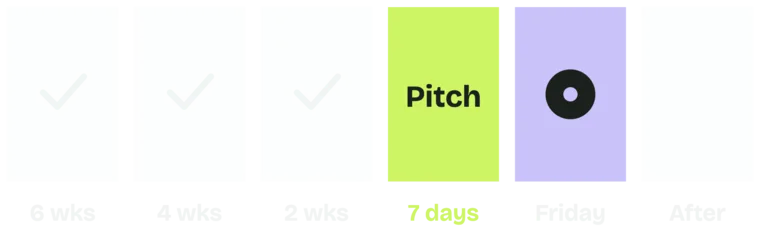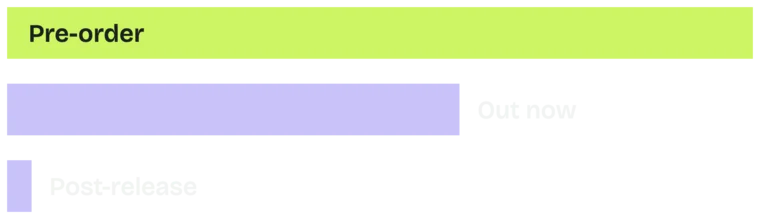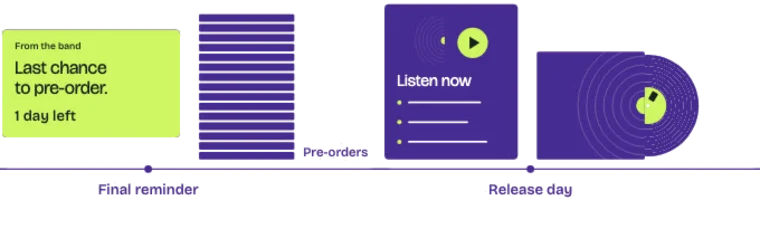

Before announcing the first single, invite fans who already engage with the artist to join the email list. A teaser post and a short DM flow give you a way to contact them directly when the news is ready.
Before I announce a record, I run a teaser period. I use ManyChat comment-to-subscribe flows, and ads to fans who have engaged with the artist, to get them onto the list. I do this on every release, and in my experience it more than pays for itself.
In this post:
- How a comment-to-subscribe flow works, step by step
- Who to aim the teaser ads at, and who to exclude
- What a band's owned audience looks like: a snapshot of The Band of Heathens' ManyChat contacts
- Why the list matters on announcement day
Why build the list before the announcement?
This is essential. With fans on the list first, you can send the first single and pre-order directly to the people who have already shown interest. If they are not on your list that day, you are paying an algorithm to maybe show it to them.
Cut.
So don't open with the announcement. Collect the fans first, then announce.
How does comment-to-subscribe work?
You post something worth wanting: a clip of the new song, a first listen, a lyric. The caption says to comment one word to get it. Everyone who comments gets an automatic direct message with a button. Once the fan taps it or replies, the flow asks for their email and sends the thing.
It works because the fan is already doing what fans do on social. They comment. You don't have to drag them to a landing page.
Keep the flow short:
- Post the offer and the keyword: "Comment SONG and I'll send you the new one first."
- Send an opening DM with a reply or tap button. A button that opens a website doesn't count.
- After the fan responds, ask for their email and make clear they're joining the list.
- Deliver what you promised, right away.
- Record the permission, tag the contact as a teaser sign-up and sync it to your email list.
Test the whole flow yourself the day you post, through to your own email landing on the list. Set up a DM keyword too, "DM me SONG", so fans have a second way in.
Then the welcome email takes over. Ours for Todd asked every new fan to reply "Hey Todd," and a short nurture sequence gave them something each time before the last email sent them to the shop. Here's how the welcome email and nurture sequence work.
In ManyChat this is the Instagram Post and Reel Comments trigger. Two things to know from its help page. It only runs on the first comment a person leaves on the post, so a later comment with the keyword won't trigger it again. And the first reply goes out as a private message.
That private reply doesn't open the conversation by itself. ManyChat's guide to comment automation says the fan has to tap a button, use a quick reply or message back. An "Open website" button doesn't count. That's why the email ask comes after the fan responds.
Who should the teaser ads go to?
Don't spend the teaser money on strangers. Run ads to people who engaged with the page, watched the videos or visited the website. Exclude everyone already on the list, so the money goes to fans you can't email yet.
On Meta you build the first group as a Page engagement custom audience, and you exclude your list with a customer list custom audience. The exclusion only catches the subscribers Meta can match, so some will still see the ad. Do the same wherever those fans are and wherever you're concentrating: Google Ads, ManyChat, Meta, X and TikTok.
Cut. Start the paragraph at "A $100 Instagram post promoting the High, Lonesome and Then Some pre-save drew 15,868 post engagements." A $100 Instagram post promoting the High, Lonesome and Then Some pre-save drew 15,868 post engagements. Those were post engagements, not unique subscribers, but they are an engaged audience to aim the next teaser at. To judge the list-building itself, track new email signups and the cost per signup.
What does a band's owned audience look like?
Here is a snapshot of The Band of Heathens' ManyChat account. These are contacts recorded across several channels over time, not the results of one teaser. Email and SMS need their own permissions, and Instagram and Facebook messages stay subject to the platforms' rules.
A list like that lets the band reach fans directly the day the news goes out.
What happens when you announce?
When the first single and the pre-order go out, the people most likely to buy are already on the list, and the email reaches them the day it matters. Without the teaser period, you're counting on the feed to tell them.
From there, the pre-order runs on email. Send fans to a listen page on your own site, and close with the last chance to pre-order email. Our guide to email marketing for musicians covers the emails in between.
Questions musicians ask
How long should the teaser period run?
Work backward from the announcement. Leave time to test the flow, deliver the offer and welcome new subscribers before the first single goes out.
Who should I exclude from the teaser ads?
Everyone already on your list. Upload it as a customer list audience and exclude it. Meta excludes the subscribers it can match, so most of the money goes to fans you can't email yet.
Does the comment trigger fire every time a fan comments?
No. ManyChat's help page says the Instagram comment trigger runs only on the first comment a person leaves on a post.
Does the DM put the fan on my list?
Not by itself. The fan has to tap a button or reply before the flow can continue. Then ask for the email, make clear it's a list signup, and sync it to your email tool.
What should you do this week?
- Build the list before you announce, not after.
- Use one clip, one keyword and a DM the fan answers before you ask for the email.
- Aim the ads at fans who engaged, and exclude your subscribers.
Pick one clip from the new record and set up a comment-to-subscribe flow on it. Test it through to a confirmed signup, the delivered clip and the welcome email before you announce anything. Your best fans should hear the news from you first.